If you’re choosing between enclosed and open 3D printers, consider that enclosed models offer safer operation by containing hot components and reducing injury risks, but they may limit accessibility for quick adjustments. Open printers are more convenient for maintenance and filament swapping but pose safety hazards from exposed parts. Enclosures improve temperature stability and print quality, especially for sensitive materials, while open printers provide easy access. Curious about balancing safety and quality? Keep exploring for more insights.
Key Takeaways
- Enclosed printers enhance safety by containing hot components and reducing injury risks, while open models expose users to safety hazards.
- Enclosures stabilize temperature and control environment, resulting in higher print quality with fewer defects and better filament compatibility.
- Open printers offer easier access for maintenance and filament changes but may lead to inconsistent print quality due to environmental fluctuations.
- Enclosed setups are ideal for high-temperature, sensitive materials like ABS and Nylon, supporting safety and advanced material use.
- Open printers provide flexibility and convenience but require vigilant safety checks and are better suited for less temperature-sensitive projects.

Multifunctional Resin 3D Printer Enclosure with Ventilation Filter, High Quality 3D Printer Vented Enclosure Tent Cover Eliminate Odors Compatible with Anycubic Elegoo Series LCD Resin UV 3D Printer
【Powerful Filtering odors and Emissions】Say hello to a clean and hassle-free resin printing experience with our Resin 3D…
As an affiliate, we earn on qualifying purchases.
As an affiliate, we earn on qualifying purchases.
What Are Enclosed and Open 3D Printers, and How Do They Differ?
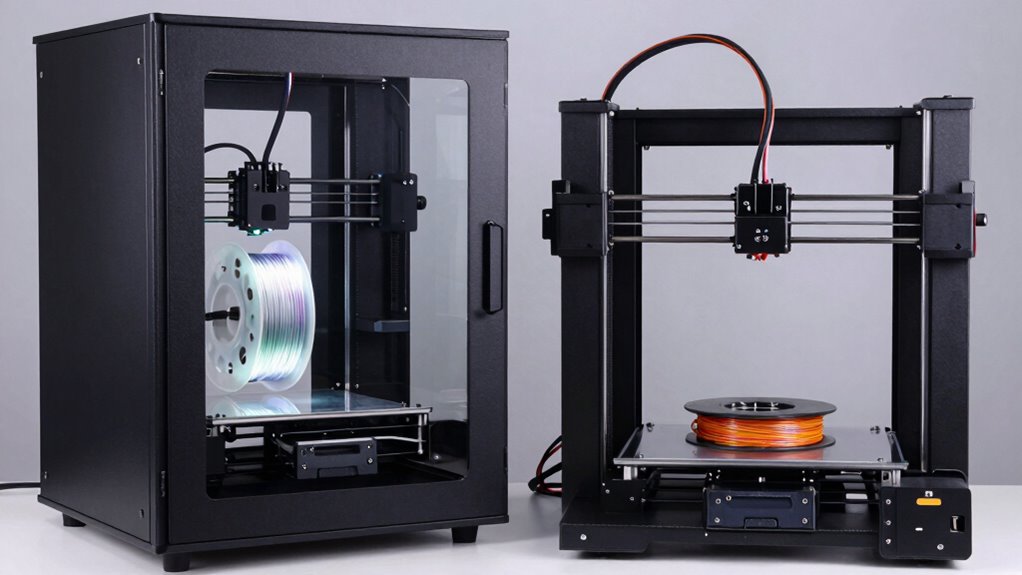
Enclosed and open 3D printers serve different needs by design. Enclosed printers are fully covered, creating a controlled environment that enhances material compatibility, especially with filaments sensitive to temperature fluctuations or drafts. This setup often leads to better print quality and fewer errors. Open printers, on the other hand, are exposed, allowing easy access for quick setup and maintenance. They typically have lower maintenance requirements because you can see and reach all components easily. However, open designs can pose safety risks and may struggle with materials needing stable conditions. Choosing between them depends on your specific needs—if you prioritize material compatibility and consistent results, an enclosed printer might be better. If convenience and ease of maintenance matter more, an open printer could suit you better. Additionally, understanding print quality factors such as temperature stability and environmental control can help you make a more informed decision, especially given the importance of environmental control for achieving optimal results.

White Teflon Tube Kit, 3D Printer Filament Guide Tube Compatible with K1/K1C/K1 Max/Ender-3 V3 3D Printers(1M)
[Low-Friction Inner Surface]:Minimizes resistance during filament feeding, ensuring smooth and consistent filament flow to avoid extrusion pauses mid-printing.
As an affiliate, we earn on qualifying purchases.
As an affiliate, we earn on qualifying purchases.
How Do Enclosed and Open Printers Compare in Safety Features?

While open 3D printers offer easy access for setup and maintenance, they generally present higher safety risks due to exposed moving parts and hot elements. These open designs make it easier to accidentally touch heated nozzles or moving components, increasing burn or injury risks. Enclosed printers, on the other hand, feature safety barriers that contain hot elements and moving parts, reducing injury potential. Regarding filament compatibility, open printers can often handle a wider variety of filaments, but this flexibility can come at the cost of safety if hot ends aren’t properly guarded. Maintenance requirements also differ; open models typically need more frequent checks to ensure safety features stay effective, while enclosed printers depend on their safety covers to minimize exposure during operation. Proper piercing care and hygiene are essential for safe and healthy healing, just as regular safety checks are crucial for maintaining 3D printer safety.

Creality 3D Printer Enclosure Fireproof and Dustproof Tent Constant Temperature Protective Cover Room for Creality Ender 3V2/Ender 3V2 Neo/Ender 3S1/Ender 3Pro/Ender 3 3D Printer
Storage Size:18.89*23.62*28.34(480*600*720mm). Compatible for Creality Ender 3V2/Ender 3S1/Ender 3Pro/Ender 3/Ender 3V2 Neo?Ender 3Neo/Ender 5/Ender 5S1/Anycubic Kobra/ELEGOO Naptune 3…
As an affiliate, we earn on qualifying purchases.
As an affiliate, we earn on qualifying purchases.
How Do Enclosures Impact Print Quality and Temperature Control?

Enclosures substantially influence print quality and temperature stability by creating a controlled environment around the print area. This stability helps maintain filament consistency and reduces warping. With better temperature regulation, you experience improved filament stability, leading to cleaner, more precise prints. Enclosures also affect cooling efficiency; by limiting airflow, they prevent uneven cooling that can cause layer separation.
- They minimize temperature fluctuations, reducing warping and layer misalignment
- They enhance filament stability, resulting in smoother surface finishes
- They improve cooling efficiency, leading to fewer print defects and better layer adhesion
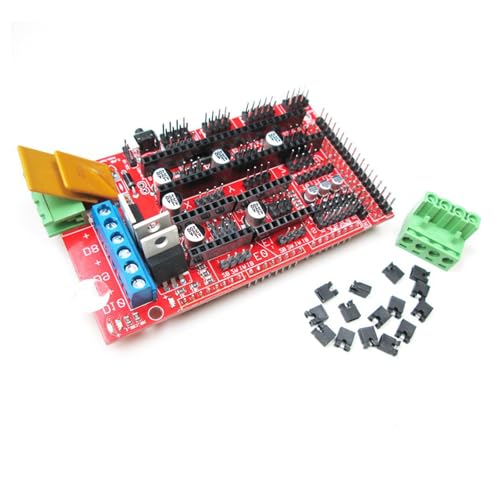
hiBCTR RAMPS 1.4: 3D Printer Control Board Reprap Shield for Arduino Mega 2560 & Pololu Drivers
Stepper Motor Flexibility: Fifth output configurable as Z-axis motor or second extruder with Pololu socket compatibility.
As an affiliate, we earn on qualifying purchases.
As an affiliate, we earn on qualifying purchases.
Which Printer Is Easier to Use: Enclosed or Open Designs?
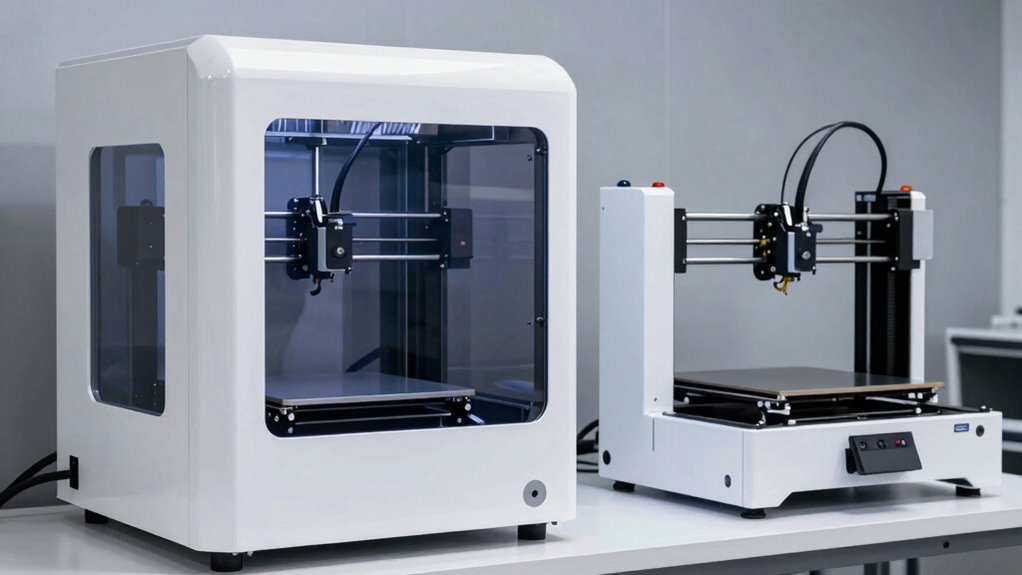
Choosing between enclosed and open 3D printers depends largely on your experience level and the complexity of your projects. Enclosed printers often provide a more user-friendly operation, with simplified controls and safety features that make setup and ongoing use easier, especially for beginners. They tend to reduce external environmental influences, minimizing troubleshooting related to temperature fluctuations. Open printers, on the other hand, usually require more maintenance complexity, as they may need frequent adjustments and careful handling to ensure consistent results. While open designs can be more accessible for experienced users who enjoy tinkering, they might pose challenges for newcomers. Overall, enclosed printers often offer a smoother learning curve, making them the easier choice for those seeking straightforward operation and less maintenance hassle. Additionally, enclosed designs can help contain hazardous fumes and prevent accidental contact with hot components, further enhancing safety. Furthermore, user safety features in enclosed models contribute to a more secure and comfortable printing environment. Many models also incorporate air filtration systems to improve indoor air quality during operation. This added layer of safety and convenience makes enclosed printers particularly suitable for users prioritizing ease of use and a controlled printing environment. Moreover, the temperature stability provided by enclosure design is essential for achieving high-quality prints, especially with sensitive materials.
Which 3D Printer Type Best Fits Your Safety and Quality Priorities?

Your safety and the quality of your 3D prints should guide your choice between open and enclosed printers. If safety is a top priority, especially with sensitive materials or high-temperature filaments, an enclosed printer offers better containment and reduces risks. For high-quality prints, consider the filament compatibility; enclosed models often support a wider range of materials, like ABS or Nylon, that require stable environments. Additionally, evaluate maintenance requirements: open printers are typically easier to access and clean, but enclosed units might need more regular sealing checks. It’s also important to consider Youngster Choice and how it influences perceptions of reliability and safety features in different printer models. Enclosed printers generally excel in safety and filament compatibility, especially for complex or temperature-sensitive materials. Open printers are simpler to maintain and allow easier access for troubleshooting and filament changes. Also, airflow management plays a crucial role in maintaining print quality and safety in both printer types. Your choice depends on balancing safety with ease of maintenance and the desired print quality.
Frequently Asked Questions
What Are the Long-Term Maintenance Costs for Enclosed Versus Open 3D Printers?
You’ll find that enclosed 3D printers often have higher long-term maintenance costs due to their complex design, which can impact filament compatibility and software integration. Open printers tend to be easier and cheaper to maintain, but you might need to replace or upgrade parts more frequently. Keep in mind, enclosed models may require specialized components, increasing your expenses over time, especially if you want seamless software integration and reliable filament options.
How Do Enclosed and Open Printers Handle Material Fumes and Ventilation?
You should know that enclosed printers typically have filtration systems and ventilation design to contain and filter fumes, making them safer for indoor use. Open printers rely on ambient ventilation, which can disperse fumes but may not be as effective at removing hazardous particles. Proper ventilation design, including exhaust fans or air purifiers, is essential for both types to guarantee a safe working environment and reduce health risks.
Can Open 3D Printers Be Upgraded With Safety Features Later?
Did you know that about 60% of open 3D printers can be upgraded with safety features later? You can absolutely enhance your open printer’s safety by adding ventilation, enclosures, or fume filters, thanks to their upgrade flexibility. This means you can improve safety enhancements over time without replacing the entire machine, making it a smart choice if you want adaptable safety options tailored to your needs.
Are There Specific Applications Better Suited for Enclosed or Open Printers?
You’ll find enclosed 3D printers better suited for applications needing high material compatibility and precise print resolution, like detailed prototypes or sensitive materials. Open printers excel in quick iterations, ease of access, and flexibility for diverse materials, but may compromise safety and resolution. Choose an enclosed model for complex, high-stakes projects, and an open one for experimentation, rapid prototyping, or when you prioritize convenience and versatility.
How Do Noise Levels Compare Between Enclosed and Open 3D Printers?
Think of noise level as the heartbeat of your workspace—enclosed 3D printers tend to beat more softly, thanks to better acoustic performance. They contain the noise, making your environment calmer and less disruptive. Open printers, however, often produce louder sounds because they lack sound-dampening enclosures. So, if you want a quieter operation, an enclosed 3D printer is your best bet for minimizing noise and creating a peaceful workspace.
Conclusion
Choosing between enclosed and open 3D printers is like picking between a cozy fortress and an open garden—each offers its own safety and quality blooms. Enclosed printers shield you like a protective shell, ensuring stability and safety, while open designs invite creativity with easier access. Ultimately, your choice shapes your printing journey—balancing risks and rewards. Remember, whether behind walls or in the open, your craft blossoms where safety and passion intertwine.