
TL;DR
Building your own AI workstation used to be cheaper, but recent component shortages and price spikes have leveled the playing field. Now, your choice depends on speed, support, and how much control you want over cooling, upgrades, and troubleshooting.
Choosing between building or buying your AI workstation isn’t just about saving money anymore. With supply chain issues and skyrocketing component prices, the old rule — build cheaper, buy faster — no longer holds. Instead, it’s become a question of what you value more: control and customization or speed and support.
In this article, I’ll break down the real costs, performance benefits, and support differences that matter in 2026. If you’re interested in the broader context of technology decisions, check out decision-making resources. Whether you’re a hobbyist, researcher, or small business, understanding these tradeoffs can save you time and money — or help you get up and running faster.
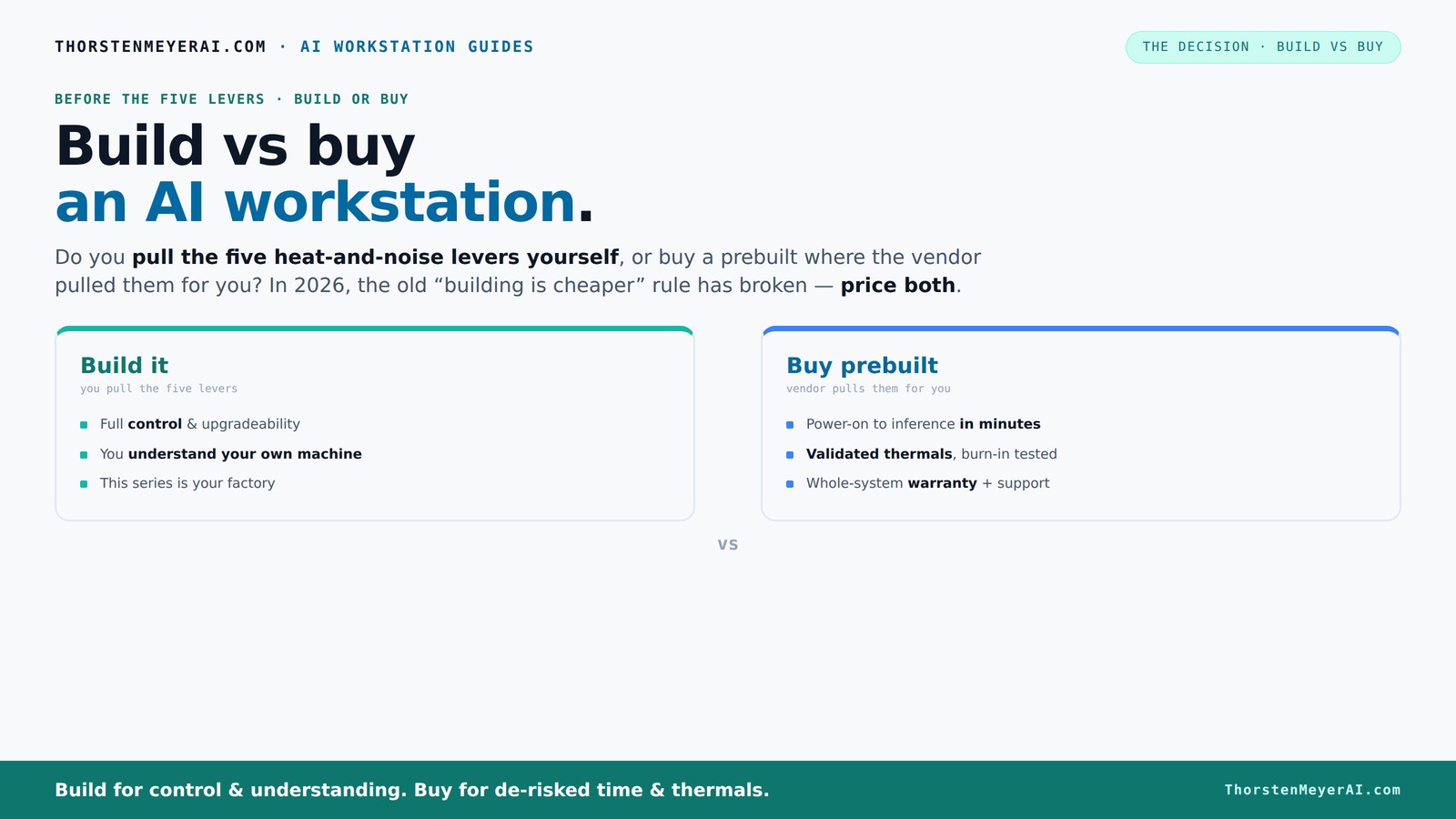
Build vs buy
an AI workstation.
The real question behind this whole series: do you pull the five heat-and-noise levers yourself, or buy a prebuilt where the vendor pulled them for you? And in 2026, the old “building is cheaper” rule has broken. Match your situation in Part 3.
Key Takeaways
- Component shortages and rising prices mean building your own AI workstation isn’t automatically cheaper in 2026. Always compare specific configs before buying.
- Managing heat and noise requires expertise; prebuilt vendors validate thermals and tune fans, saving you time and effort.
- Choose building for maximum upgradability and long-term flexibility; opt for prebuilt if you need quick deployment and reliable support.
- Match your hardware to your workload — VRAM, GPU type, and cooling matter more than raw specs for AI tasks.
- Support and warranty can be make-or-break—prebuilts often come with professional help, while DIY demands troubleshooting skills.

WIWB Gaming PC Desktop Core I9-14900HX, GeForce RTX 5060 Ti 8G, 16G DDR5 RAM, 1TB NVME SSD, WiFi 6, 4K 8K High-End Prebuilt PC Computer Tower for Streaming, Video Editing & Workstation Use (Black)
UNSTOPPABLE PROCESSING POWER: Powered by the Intel Core i9-14900HX processor (24 Cores, 32 Threads) with a max turbo...
As an affiliate, we earn on qualifying purchases.
As an affiliate, we earn on qualifying purchases.
Why Building Your Own AI Workstation Is No Longer Always Cheaper
Building used to be the clear winner for cost. You could cherry-pick parts, avoid vendor margins, and upgrade gradually. But in 2026, the landscape has shifted. Component shortages and high demand for GPUs, DDR5 RAM, and SSDs have driven prices up across the board.
For example, a DIY system that once cost under $1,000 now easily hits $1,250+ just for parts, before adding an OS or software. Meanwhile, big manufacturers like Lambda and Puget leverage bulk buying and have systems ready to go at comparable prices. Sometimes, they even beat DIY on cost.
This means the old rule — build cheaper — no longer applies automatically. You need to compare specific configurations today, factoring in the current market and your workload. It’s a game of actual prices, not assumptions.
Beyond cost, building your own system involves tradeoffs in time, expertise, and risk. You must weigh whether the potential savings justify the effort and whether you’re comfortable troubleshooting hardware issues or dealing with compatibility challenges. Additionally, the rapid pace of hardware advancements means your DIY system might become outdated faster, prompting more frequent upgrades or replacements.

ASUS ROG GM700 (2025) Gaming Desktop PC, AMD Ryzen™ 7 9800X3D Processor, AMD® Radeon™ RX 9070 XT Prime OC, 2TB M.2 NVMe™ PCIe® 4 SSD, 32GB DDR5 RAM, Windows 11 Home, GM700TZ-MS777
Game and create with Windows 11 Home – Unlock your potential with Windows 11 Home, designed for gaming,...
As an affiliate, we earn on qualifying purchases.
As an affiliate, we earn on qualifying purchases.
The Heat and Noise Levers: Who Tames the Beast?
Managing heat and noise in a high-power AI workstation is like taming a furnace. For more on optimizing your workspace, visit workspace optimization tips. Pulling the right levers — undervolting GPUs, matching cooling to load, optimizing airflow, and tuning fans — requires expertise and time.
If you build it yourself, you control every detail. You choose a quiet GPU, pick a case with sound-dampening features, and fine-tune fan curves. This gives you a machine perfectly tailored to your space and noise tolerance. But it also means you’re on the hook for ongoing maintenance and troubleshooting.
Buy a prebuilt, and the vendor handles these levers. They validate thermals, run stress tests, and often include water-cooling for quieter operation. Companies like BIZON or Lambda advertise systems with up to 30% lower noise and temperature under load, with warranty support. It’s a turnkey solution that saves you the effort and guesswork, especially for multi-GPU setups that are notoriously thermally challenging.
Understanding how thermal management works reveals why prebuilt systems often perform better in sustained workloads. Vendors invest in optimized cooling solutions that balance airflow, component placement, and noise reduction, which can be difficult to replicate at home without significant expertise and trial-and-error. For professionals working long hours or in noise-sensitive environments, this difference in thermal management can translate into more stable performance and longer hardware lifespan.
So, it’s really: do you want to pull the levers, or pay someone else to do it for you?

NOVATECH AI Workstation Desktop PC – Intel Core i9-14900K, Liquid Cooling – Machine Learning, Data Science, 3D Rendering, Video Editing, Simulation (RTX 5080 | 64GB RAM | 2TB)
Extreme AI & Machine Learning Performance Powered by the Intel Core i9-14900K and RTX 5080 with 16GB VRAM,...
As an affiliate, we earn on qualifying purchases.
As an affiliate, we earn on qualifying purchases.
Performance for AI: Which Setup Truly Fits Your Workload?
Performance isn’t just about raw specs — it’s about matching your workload requirements. For local LLM inference, a GPU with 24+ GB VRAM like the RTX 4090 is ideal. For training large models, you might need multi-GPU rigs with robust power and cooling.
According to research, GPUs like the A100 or RTX 6000 excel for sustained training, but they come at a premium. For inference and fine-tuning, consumer-grade cards with good VRAM and undervolting can do the job, and are easier to cool.
Choosing between build and buy depends heavily on your use case. A prebuilt might come with validated multi-GPU setups, tested cooling, and optimized power delivery. Building offers flexibility to customize VRAM, storage, and motherboard features, but requires careful planning and testing.
Understanding your workload is crucial because hardware choices directly impact efficiency, cost, and scalability. For instance, opting for a high-end GPU with excessive VRAM for a small-scale project can lead to unnecessary expenditure, while under-spec’ing can bottleneck performance. Conversely, a prebuilt system tailored for your workload can provide assurance that the hardware components are balanced and optimized for your specific AI tasks.
In essence, the key is matching your hardware to your workload’s demands, balancing performance, cost, and future growth potential.

NVD RTX PRO 6000 Blackwell Professional Workstation Edition Graphics Card for AI, Design, Simulation, Engineering - 96GB DDR7 ECC Memory - 4th Gen RT/5th Gen Tensor Core GPU - OEM Packaging
[NVIDIA Blackwell Streaming Multiprocessor] The new SM features increased processing throughput, and new neural shaders that integrate neural...
As an affiliate, we earn on qualifying purchases.
As an affiliate, we earn on qualifying purchases.
Upgradability and Longevity: Can You Keep Your System Fresh?
Building your own system usually means more future-proofing and upgradability. You pick a motherboard with plenty of PCIe lanes, upgrade-friendly power supplies, and room for extra RAM or SSDs. When a new GPU arrives or you need more storage, it’s straightforward to swap parts.
Prebuilts, however, often use proprietary or limited-connectivity components. That means upgrades can be tricky or impossible without replacing the whole system. Some vendors offer upgrade paths, but they’re not always flexible or cost-effective in the long run.
For example, a DIY rig with a standard ATX motherboard might support a next-gen GPU or more RAM years down the line. A prebuilt might lock you into the original specs until you buy a new system.
If your project will evolve or you need to stay current over several years, building offers more control and adaptability. This flexibility can lead to significant cost savings and performance improvements over time, as you can upgrade individual components as needed rather than replacing the entire system. It also allows you to tailor your system to emerging AI workloads or hardware innovations, ensuring your investment remains relevant longer.
Support, Warranty, and Peace of Mind
When your AI work relies on continuous uptime, support and warranty become key. Prebuilts come with professional support, often with warranties of 3-5 years that cover parts and labor. They’ve already tested the system, so if something fails, you call support and get quick help.
DIY systems rely on individual component warranties, which can be complicated if a GPU or motherboard fails. Troubleshooting becomes your responsibility, and downtime can cost you. However, you gain the ability to choose high-quality, reliable parts, and fix issues yourself if you’re comfortable.
For example, a prebuilt like Lambda offers on-site support and a single point of contact, reducing stress during critical projects. DIY requires more technical skill but can be cheaper if you’re confident in your troubleshooting abilities. The choice often comes down to your risk tolerance: if your project timeline is tight and downtime is costly, professional support can provide invaluable peace of mind, ensuring minimal disruption and faster resolution of issues.
Understanding the implications of support and warranty options helps you evaluate whether the potential savings of DIY are worth the increased responsibility and risk. In high-stakes AI projects, having a support plan in place can mean the difference between a minor hiccup and a costly delay.
Making the Call: Which Path Fits You?
Deciding whether to build or buy hinges on your skills, time, budget, and workload. If you crave total control, want to optimize every thermal detail, and plan to upgrade over years, building makes sense. It’s a craft and a long-term investment.
But if you need a machine that works immediately, with validated thermals, solid support, and less hassle, a prebuilt can be a smarter choice. Especially now, with prices often comparable or even better than DIY, it’s worth considering.
Remember: the best AI workstation isn’t the one with the flashiest specs — it’s the one that fits your work style, budget, and timeline.
Choosing between building and buying isn’t just about cost. It’s about aligning your technical skills, time availability, and long-term goals with the realities of the hardware market. A DIY approach can be rewarding but requires patience and expertise. Conversely, prebuilt systems offer convenience and support but may limit customization. Carefully assess what matters most—performance, flexibility, support, or speed—and make a choice that sets you up for success in your AI projects.Frequently Asked Questions
Is it cheaper to build or buy an AI workstation in 2026?
It’s not automatically cheaper anymore. Due to component shortages and price spikes, a prebuilt can often match or beat DIY costs for comparable specs. Always compare specific configurations before deciding.
Which setup offers better performance for GPU-heavy AI workloads?
Both can deliver excellent performance, but a prebuilt from a vendor like Lambda is often validated for multi-GPU setups with optimized cooling and power delivery. DIY allows customization but requires careful planning.
Can I upgrade a prebuilt system later?
It depends. Many prebuilts use proprietary parts or limited-connectivity components, making upgrades tricky. Building your own gives you more freedom and longer-term upgrade paths.
How important is cooling and noise management for AI workstations?
Very. AI workloads generate a lot of heat, especially with high-end GPUs. Proper cooling prevents throttling and noise, whether you manage it yourself or rely on vendor validation.
What support and warranty options should I look for?
Prebuilts often include professional support and longer warranties, reducing downtime risks. DIY relies on individual component warranties and your troubleshooting skills.
Conclusion
In the end, your choice depends on your needs and priorities. Building is a craft that rewards patience, skill, and long-term planning. Buying offers speed, support, and a lower stress path to AI deployment.
In 2026, don’t assume DIY is always cheaper or better. Weigh the tradeoffs carefully, and pick what aligns best with your workload and comfort level. Your perfect AI workstation is the one that gets you to productivity fastest and keeps you there.