Among these educational robot kits for kids, I rank the Makeblock mBot as the best overall for its balance of hands-on building and coding, while the Matatalab Coding Robot Set stands out for screen-free learning and the Educational Insights Design & Drill Robot Workshop for young beginners. The biggest choice is between kits that teach coding, kits focused on construction, and robots that offer a guided or playful first step. Age labels matter, but a child’s patience for assembly and interest in repeatable coding challenges matter just as much. Some kits offer multiple builds or power options, while others keep the activity simpler and more focused. Read on for my full comparison and guidance on which style best matches your child.
Key Takeaways
mBot is my best overall pick because it combines robot construction with coding, rather than centering the experience on building alone.
Matatalab and Design & Drill serve different beginner needs: Matatalab introduces screen-free programming, while Design & Drill emphasizes hands-on assembly for younger children.
Solar kits trade convenience for energy exploration. The Sillbird 12-in-1 and 13-in-1 solar kits offer multiple builds, but their solar focus makes them less suited to children seeking consistent motorized play indoors.
More build configurations do not automatically mean more coding depth. The Klever Kits 36-in-1 and Sillbird 12-in-1 prioritize construction variety, while the TinkRbot AI and mBot are more relevant to families seeking programming as a central activity.
Age range is only a starting point. Kits such as the WhalesBot C3 Pro and Matatalab list younger ages, while many other options target school-age builders; match the kit to the child’s reading, fine-motor, and troubleshooting comfort.



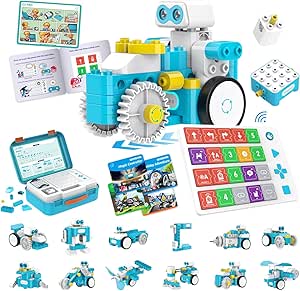
| educational robot kits for kid | Age range |
|---|---|
| Smart Robot Car Kit for Kids A | 8+ |
| Sillbird STEM Robot Building K | 8–13 years |
| FF Nova Mini Programmable Huma | 18 months–3 years |
| Educational Insights Design & | 36 months–6 years |
| Sillbird 12-in-1 Solar Robot B | Title: 8–13 years; specs: 10 years and up |
| Robot Building Kits for Kids | — |
| Drawing Robot for Kids with 20 | — |
| TinkRbot AI Robot Building Kit | — |
| STEM 13-in-1 Solar Power Robot | — |
| Klever Kits 36-in-1 Motor Robo | — |
| Matatalab Coding Robot Set for | 4–10 years |
| Makeblock mBot STEM Coding Rob | 8 years and up |
| WhalesBot C3 Pro 12-in-1 Remot | 4 years and up |
More Details on Our Top Picks
Smart Robot Car Kit for Kids Ages 8-16
The EggTailz kit is the clearest pick here for children curious about how a robot responds to its surroundings. Its self-balancing design and obstacle avoidance give the car more to do than a basic remote-controlled build, while autonomous and remote-control modes let kids compare programmed behavior with direct steering. Compared with the Sillbird 5-in-1 kit, it emphasizes operating one responsive robot rather than rebuilding several different forms. That focus can make the core idea easier to explore, but it offers less variety in the construction itself. The rechargeable car battery avoids frequent battery swaps, though the remote needs two AA batteries. Younger builders may also need adult help during assembly, so this is a better fit for a child ready to follow hands-on instructions than for someone seeking a quick, ready-to-play toy.
Pros:- Self-balancing and obstacle-avoidance features make robot behavior visible during play.
- Autonomous and remote-control modes offer different ways to operate the car.
- Built-in rechargeable battery charges in two hours.
- Combines electronics and robotics play with hands-on assembly.
Cons:- Younger children may need parental assistance with assembly.
- The remote requires two AA batteries, which the supplied information says are not included.
- Its single-car focus offers less rebuild variety than the Sillbird 5-in-1 kit.
Best for: Kids ages 8 and up who want to explore obstacle response and self-balancing behavior through hands-on robot-car play.
Not ideal for: Families seeking many rebuild options or a kit a younger child can assemble independently; this focuses on one robot car and may need adult assembly help.
- Brand:EggTailz
- Model number:265-A
- Age range:8+
- Educational objectives:Concentration, creativity, hands-on skills, STEM
- Car battery:Built-in rechargeable; charges in 2 hours
- Remote batteries:2 AA
Our verdict“Choose this kit for a child interested in a responsive, self-balancing robot car rather than a multi-model construction set.”
Sillbird STEM Robot Building Kit with Remote Control for Boys 8-13
For a child who enjoys taking a build apart and starting a different one, this Sillbird kit offers the broadest construction choice among these five picks. Its 488 pieces and five build options—including a robot, dinosaur, car, and tank—make it more of a repeat-building project than the EggTailz self-balancing car, which centers on one vehicle and its movement features. App and remote control add two ways to operate the finished model, while the detailed instructions can help kids work through assembly. The tradeoff is that changing builds takes time, and the more complex options may frustrate younger children. Up to 40 minutes of battery life also puts a limit on each play session, so this suits kids who value construction and variation over long stretches of uninterrupted driving.
Pros:- Five build options provide more construction variety than the single-car EggTailz kit.
- 488 pieces support hands-on building and rebuilding.
- App and remote control give kids alternative ways to operate the model.
- Clear, detailed instructions support independent assembly for many children.
Cons:- Battery life is listed as up to 40 minutes, limiting uninterrupted play.
- Complex builds can challenge younger children in the stated age range.
- Rechargeable batteries may need additional purchase, according to the product information.
Best for: Ages 8–13 builders who like following plans, rebuilding models, and switching between app and remote control.
Not ideal for: Children who want a simple first build, long continuous play, or a robot that is ready to operate without frequent rebuilding.
- Number of pieces:488
- Age range:8–13 years
- Control modes:Bluetooth app and remote control
- Build options:Robot, dinosaur, car, tank, and more
- Battery life:Up to 40 minutes
- Dimensions:6 × 7 × 8 inches
- Weight:1.8 pounds
Our verdict“Pick this for a child who values rebuilding different robot-themed models more than extended runtime or a simpler first project.”
FF Nova Mini Programmable Humanoid Robot for Kids with Live Online Robotics Course
The FF Nova Mini takes a different route from construction-focused kits: the learning centers on interacting with a 17-joint humanoid robot and participating in a live online robotics course, rather than assembling multiple models as with the Sillbird 5-in-1. Voice commands and movement routines, including walking and gymnastics, give children an accessible way to see a robot respond and move. The course could add structure for families who want guided learning instead of figuring out activities on their own. However, the listed age range of 18 months to 3 years is unusually young for a product described as programmable, and the available details do not explain the coding interface or class format. Internet access and live-class participation are also required, making this a specialized choice rather than a flexible, self-directed kit.
Pros:- Seventeen joints support a range of humanoid movements.
- Voice commands provide an interactive way to prompt the robot.
- A live online course adds guided robotics activities.
- At under 2.2 pounds, the robot is relatively lightweight.
Cons:- The listed age range may exclude most school-age children seeking robotics kits.
- Live online classes require internet access and scheduled participation.
- The product details provide limited information about durability and battery life.
Best for: Families with a child in the listed 18-month-to-3-year age range who want a moving humanoid robot paired with guided online activities.
Not ideal for: Older children seeking hands-on construction or self-paced coding; the age range is very young and the course requires internet access and live participation.
- Brand:Faraday Future
- Model name:FF-NOVA-MINI-COURSE
- Age range:18 months–3 years
- Height:13.7 inches
- Weight:Under 2.2 pounds
- Joints:17
- Connectivity:Voice commands
- Material:Aluminium-alloy
- Included components:Humanoid robot
Our verdict“Consider this for a very young child whose family wants guided humanoid-robot activities, not a conventional build-and-code kit.”
Educational Insights Design & Drill Robot Workshop
For preschoolers, the Design & Drill Robot Workshop makes construction tangible without starting with coding, apps, or intricate multi-model builds. Children use a child-sized drill and screwdriver to attach bolts and gears, practicing fine motor control while creating and customizing robot designs. That hands-on approach is more age-appropriate for the listed 3–6 range than the Sillbird 5-in-1, whose 488-piece builds target older children. The difference is that this workshop teaches foundational building actions, not programmable robot behavior. Its 70-plus pieces allow creative variation, but small parts may be a concern for very young children, and the tool needs two AA batteries that are not included. I’d choose it as an early engineering play set, not as a substitute for an electronics or coding kit.
Pros:- Drill and screwdriver let young children take an active role in assembly.
- More than 70 pieces support multiple robot designs.
- Bolts and gears encourage fine motor practice and foundational engineering play.
- A simpler starting point for preschoolers than the Sillbird 5-in-1 kit.
Cons:- The kit focuses on construction and imaginative play rather than coding or electronics.
- The drill requires two AA batteries, which are not included.
- Some parts may be too small for very young children.
Best for: Preschool children ages 3–6 who are ready to practice using simple tools and assembling customizable robot designs with adult supervision.
Not ideal for: Older kids looking for coding, moving robot functions, or a more advanced build; small pieces and the age-limited activity may not hold their interest.
- Brand:Educational Insights
- Model number:4177
- Age range:36 months–6 years
- Included tools:Drill, screwdriver, gear socket bit
- Bolts:32
- Gears:7
- Other included component:Sticker sheet
Our verdict“Choose this as a first robot-building activity for a preschooler, but look to an electronics-focused kit for coding and robot behavior.”
Sillbird 12-in-1 Solar Robot Building Kit STEM Gift for Boys Ages 8-13
This Sillbird kit turns the power source into part of the lesson: kids assemble one of 12 models and see how a solar panel can drive a simple moving build. That makes it a stronger fit for renewable-energy exploration than the EggTailz car, which focuses on self-balancing and obstacle avoidance rather than solar power. With 190 parts, it offers plenty of model variety, though it has fewer pieces than the Sillbird 5-in-1’s 488-piece set. Its biggest tradeoff is dependence on light: the product information says outdoor sunlight or strong artificial light is needed for better operation, and there is no battery backup. The supplied age details also differ—the title says ages 8–13, while the specs say 10 and up—so I’d favor it for older builders who can manage the assembly and accept light-dependent play.
Pros:- Twelve model options encourage rebuilding and experimentation.
- Solar power makes energy conversion part of the hands-on STEM activity.
- 190 parts offer substantial construction variety in a compact kit.
- Instructions are described as clear and suitable for family involvement.
Cons:- Performance depends on outdoor sunlight or strong artificial light.
- No battery is included, so play is not independent of light conditions.
- The title and specifications give different age guidance.
Best for: Older children and families who want a multi-model building project that introduces solar power and can be used in bright conditions.
Not ideal for: Younger builders who need a consistently powered robot or families without access to strong light; the listed age guidance also conflicts between title and specs.
- Brand:Sillbird
- Age range:Title: 8–13 years; specs: 10 years and up
- Number of pieces:190
- Builds:12 models, including robots and cars
- Power source:Solar
- Material:ABS
- Dimensions:10.24 × 7.87 × 2.56 inches
Our verdict“Choose this for light-dependent solar-energy learning and multiple builds, provided the child is old enough and has access to bright conditions.”
Robot Building Kits for Kids, STEM Educational Remote Control Programmable Robot Set, Rechargeable Robotic Kit for Boys and Girls Age 8-12
With 635 pieces and both remote-control and programmable play, this kit suits kids who want to build before they start experimenting with robot behavior. Its larger parts count gives children room to assemble and explore different designs, while the move hub adds a step beyond a purely mechanical kit like the Klever Kits 36-in-1. The tradeoff is that this is less focused on a single lesson: it does not offer the solar-energy theme of the STEM 13-in-1 Solar Power Robot Kit, and the available details do not specify coding languages or guided challenges. Assembly can take time, and younger builders may need an adult nearby. I’d choose it for a child ready to combine construction with basic programming, not for someone who wants a quick, ready-to-play activity.
Pros:- 635 pieces support hands-on construction and creative builds.
- Combines programmable behavior with remote control.
- Rechargeable operation avoids relying on disposable batteries.
- Kid-friendly plastic and easy-to-connect bricks are described in the product details.
Cons:- Assembly may take considerable time, especially for younger builders.
- Requires adult supervision for younger children and is not suitable under age 6.
- The listed information does not explain the programming interface or provide specific guided coding lessons.
Best for: Families with children age 6 or older who want a substantial build-and-program project with remote-control play.
Not ideal for: Kids who need short, highly guided activities, or families who do not want to supervise assembly and small-piece handling.
Our verdict“Choose this kit for a child ready to pair a sizable brick build with programmable and remote-controlled robot play.”
Drawing Robot for Kids with 200 Cards – Learning Toy for Ages 3-12
This drawing robot takes a gentler route into interactive learning than construction kits: children follow 200 themed cards as the robot recognizes prompts and guides drawing and coloring. That makes it more approachable for preschoolers than the TinkRbot AI Robot Building Kit, which is aimed at ages 12 and up and requires building and programming. It also stands apart from the Educational Insights Design & Drill Robot Workshop in the lineup by centering on guided art rather than assembling a robot. The payoff is screen-free creative play with lights and music, but the activity range stays narrow: it does not teach mechanical construction or coding. Recognition accuracy may vary, and the listed battery capacity does not establish how long a charge lasts, so it is a weaker fit for long sessions.
Pros:- Includes 200 themed drawing cards for varied guided activities.
- Screen-free format pairs drawing and coloring with robot interaction.
- Rechargeable design includes a USB charging cable.
- LED lights and music add interactive cues during play.
Cons:- Activities are limited mainly to drawing and coloring.
- Recognition accuracy may vary, which can interrupt a guided activity.
- Battery runtime is not specified, and the product details warn it may not suit extended play.
Best for: Parents of preschool and early-elementary children who want a guided, screen-free drawing activity with an interactive robot.
Not ideal for: Families seeking hands-on robot construction, coding lessons, or a kit with a broad range of engineering challenges.
Our verdict“Pick this for young children who will enjoy guided art with a robot, but skip it if your priority is building or coding.”
TinkRbot AI Robot Building Kit, Coding STEM Robotics Kit 12+
For older learners, the TinkRbot AI offers a more authentic engineering project than the brick-based Robot Building Kits for Kids: its aluminum chassis, PCB, motors, servo, and ultrasonic sensor put real hardware at the center of building and programming. That component mix gives teens a chance to work with sensing and motion rather than only assembling a toy-style model. It is also a stronger fit for repeat projects than the STEM 13-in-1 Solar Power Robot Kit, whose builds revolve around solar-powered designs. The tradeoff is a steeper entry point: it is recommended for ages 12+, and the product description says some technical knowledge is needed. The listed parts are substantial, but the details do not specify a coding platform or step-by-step lesson structure, so beginners may need extra guidance.
Pros:- Includes an ultrasonic sensor, motors, and servo for hands-on robotics work.
- Supports rebuilding and reprogramming across repeated projects.
- Aluminum chassis and acrylic panels offer a different build experience from basic plastic brick kits.
- Includes a remote, wheels, USB cable, and screwdriver alongside the electronics.
Cons:- Recommended for ages 12 and up, limiting its fit for younger children.
- Building and programming require some technical knowledge.
- The product details do not name a coding platform or describe the lesson sequence.
Best for: Teens age 12+ with an interest in programming and electronics, or classrooms seeking a reusable sensor-and-motor robotics project.
Not ideal for: Younger children and first-time builders who need a highly guided kit with clearly specified coding lessons.
Our verdict“Choose the TinkRbot for a technically curious teen who wants real sensors and motors, not a simplified starter robot.”
STEM 13-in-1 Solar Power Robot Kit for Kids Aged 8-12
The strongest reason to choose this kit is its clear teaching theme: children assemble 13 robot designs powered by solar energy, including models intended to move on land or water. Compared with the Klever Kits 36-in-1 Motor Robotic Kits, it offers fewer build variations but ties those builds to a specific idea—how sunlight can power movement. That makes it a useful choice for families who want an activity connected to renewable energy rather than a general motorized robot collection. The limitation is also built into that lesson: operation depends on sunlight, with no battery backup listed, so indoor play or cloudy conditions can stall the project. Assembly may challenge younger children in its recommended 8–12 age range, and it does not list programming or remote-control features.
Pros:- Offers 13 different solar-powered robot builds.
- Connects hands-on construction with a focused introduction to solar energy.
- Models are described as able to move on land or water.
- Uses non-toxic, smooth ABS material, according to the product details.
Cons:- Needs sunlight to operate and has no battery backup listed.
- Assembly may be challenging for younger children in the recommended age range.
- Does not list coding or remote-control functions.
Best for: Children age 8–12 who enjoy building models and can test them outdoors or in a reliably sunny space.
Not ideal for: Families seeking indoor-ready, programmable, or remote-controlled robot play regardless of weather.
Our verdict“Choose this kit for sunny-day building that teaches solar power, but not for dependable indoor robot operation.”
Klever Kits 36-in-1 Motor Robotic Kits for Kids, Educational STEM Toy for Ages 8-13
With 36 possible builds and 14 motorized models, this kit favors variety over the deeper electronics focus of the TinkRbot AI Robot Building Kit. Its walking machines and racing cars give children a way to explore how motors affect movement, while organized parts and instructions help keep a multi-build project manageable. Compared with the STEM 13-in-1 Solar Power Robot Kit, it offers more listed designs and does not depend on sunlight, though its product details do not identify a specific energy lesson. Video tutorials add another route into assembly, but the kit is still primarily about construction and mechanics; no programmable controls are listed. It is recommended for ages 8–13, and small parts make it a poor match for younger siblings who might share the play space.
Pros:- Provides 36 listed build options, including 14 motorized models.
- Walking machines and racing cars make motor-driven movement tangible.
- Includes instructions and video tutorials to support assembly.
- Organized parts tray can make sorting and storage easier.
Cons:- No programming, sensors, or remote-control features are listed.
- Small parts make it unsuitable for younger children who may be nearby.
- The listed learning focus is mainly construction and mechanics rather than a specific coding or energy topic.
Best for: Children age 8–13 who like rebuilding models and want several motorized designs without relying on sunlight.
Not ideal for: Families looking for coding instruction, sensor-based robotics, or a kit suitable for children under 8.
Our verdict“Pick Klever Kits for repeated mechanical builds and motorized variety, not for coding or advanced robotics.”
Matatalab Coding Robot Set for Kids 4+ – Screen-Free STEM Programming Toy
Matatalab’s physical coding blocks make this the clearest choice for families who want young children to practice programming without an app or screen. Kids arrange commands on the control board, and the command tower reads them for the robot, turning sequences into visible movement. Compared with the WhalesBot C3 Pro, Matatalab puts more emphasis on block-based coding than on building different robot forms and using storybooks. Its challenge booklets, map, obstacles, and flags give lessons a practical play setting, though the initial setup may take adult help, especially for younger users. The 4–10 age range is broad, but older children may want more open-ended programming or expansion options. Because play centers on the supplied physical blocks, extending the activities may require add-ons.
Pros:- Teaches sequencing and programming through physical coding blocks without an app
- Includes challenge booklets, a game map, obstacles, and flags for varied activities
- Suitable for both home learning and classroom use
- Supports problem-solving, critical thinking, and creative play
Cons:- Younger children may need adult supervision and help with the initial setup
- Physical components can take time to arrange and learn
- The supplied block-based system may feel limiting without additional add-ons
Best for: Parents and teachers of ages 4–10 who want guided, hands-on coding practice with no screen or app
Not ideal for: Families seeking advanced coding software, frequent robot redesigns, or a kit that needs little setup help
- Brand:MatataStudio
- Age range:4–10 years
- Robot:MatataBot
- Included coding pieces:37 coding blocks
- Included learning materials:3 challenge booklets and a two-sided game map
- Included control hardware:Command Tower with image recognition camera and Control Board
- Other included components:USB-C cable, obstacles, and flags
- Materials:Cardboard, PVC, and plastic
Our verdict“Choose Matatalab for screen-free, guided coding activities for young learners, but skip it if you want software-based progression or extensive expansion.”
Makeblock mBot STEM Coding Robot Kit for Kids Ages 8-12
Makeblock mBot suits older beginners who are ready to connect a robot build with electronics and coding software. Its line-following and obstacle-avoidance functions give kids tangible projects to program, while compatibility with Scratch and Arduino offers a path beyond introductory exercises. That makes it a more software-oriented pick than Matatalab, whose physical blocks support screen-free play, and a better fit for children who want to keep progressing through coding platforms. The tradeoff is a steeper technical setup: some functions may take prior knowledge or adult assistance, and batteries are not included. The kit is described as beginner-friendly and has tutorials, but its core functions remain introductory, so experienced young coders may outgrow the included robot without add-on modules.
Pros:- Combines robot building with electronics and programming practice
- Supports Scratch and Arduino for a progression from beginner coding
- Line-following and obstacle avoidance provide concrete programming projects
- Tutorials and clear building instructions support first-time builders
Cons:- Batteries are not included
- Some functions may require technical setup or prior knowledge
- The included beginner functions may not satisfy experienced coders without add-ons
Best for: Ages 8 and up who want to build a starter robot and learn through Scratch or Arduino, with an adult available for setup
Not ideal for: Younger children who need screen-free play, or families seeking a ready-to-run kit with batteries included
- Brand:Makeblock
- Age range:8 years and up
- Model number:90053
- Included components:Robot Kit
- Coding platforms:Scratch and Arduino
- Robot functions:Line-following and obstacle avoidance
- Expansion compatibility:Various add-on modules and LEGO parts
- Power:Batteries not included
Our verdict“Pick mBot for an older beginner ready to progress from building into software-based robotics, but choose Matatalab for screen-free learning or WhalesBot for younger, story-led activities.”
WhalesBot C3 Pro 12-in-1 Remote Control & Coding Robot Kit for Kids 4+
WhalesBot C3 Pro brings early coding together with hands-on construction, storybooks, and remote control, making it the most varied play format among these younger-child picks. Its 52 structural parts support multiple builds, while coding cards and an activity map give children prompts for trying basic programs. Compared with Matatalab, which centers on a dedicated robot following physical block commands, WhalesBot offers more emphasis on assembling different forms and connecting activities to stories. Bluetooth and remote control add another way to interact, though families should check whether that suits their preference for screen-free play. The kit’s age range starts at four, but young builders may need help with assembly. Its programming is aimed at early learners, so older children seeking more advanced coding may prefer Makeblock mBot.
Pros:- Combines multiple robot builds with coding cards, storybooks, and an activity map
- Remote control and Bluetooth provide interactive ways to operate the robot
- 52 structural parts support hands-on construction
- Smooth-edged blocks and non-hazardous materials are listed as safety features
Cons:- Younger children may need adult supervision and help with assembly
- Programming is designed for early learners rather than advanced coding
- Bluetooth connectivity may not suit families seeking an entirely screen-free experience
Best for: Families with children ages 4 and up who enjoy building, story-based activities, and beginner coding in one kit
Not ideal for: Older children who want advanced programming, or buyers looking for a screen-free kit focused only on coding blocks
- Model name:WhalesBot-C3 Pro
- Model number:C3 Pro
- Age range:4 years and up
- Structural parts:52
- Coding materials:1 coding panel and 38 coding cards
- Learning materials:4 storybooks and an activity map
- Connectivity:Bluetooth
- Safety features:Smooth-edged blocks, no sharp parts, and non-hazardous materials
Our verdict“Choose WhalesBot for young children who learn through stories and rebuilding, while Matatalab is a stronger fit for screen-free command-block practice and mBot for older coders.”
How We Picked
I compared these kits by how clearly they connect play to learning: whether children build a working robot, practice programming, explore mechanisms or energy, or follow a guided activity. I also weighed the likely setup burden, the role of adult help, age suitability, and whether a kit invites repeated experiments instead of a one-time build. Those factors matter more than a large model count on its own: a child who wants to code may get less from a kit built mainly around assembly, and a first-time builder may benefit more from a simple, focused activity.
The ranking favors kits with a useful balance of learning, usability, and room to keep exploring. That puts the Makeblock mBot first as a versatile choice, while specialized picks rank higher for their particular audience rather than claiming to suit every child. I also account for tradeoffs: solar dependence, screen-free limits, narrower activity styles, and the possibility that younger users will need an adult nearby. Product descriptions alone do not establish long-term durability or learning outcomes, so I avoid treating model counts or feature labels as proof of either.
Factors to Consider When Choosing Educational Robot Kits For Kids
Before choosing a kit, I would start with the kind of learning your child will actually enjoy repeating. A robot can be a coding tool, a construction project, a screen-free logic game, or an introduction to motors and energy; those experiences are related, but not interchangeable. These factors help narrow the choice beyond age labels and feature lists.
Choose the Learning Activity Before the Robot
Ask whether your child is more drawn to making something with their hands, giving a robot instructions, or watching a mechanism respond. These interests point toward different kit styles, even when each product is labeled STEM or educational. A building-first kit can be satisfying without offering much programming, while a coding-focused option may require more time at a screen or with structured logic. A common mistake is buying for the word “robot” and assuming every kit teaches the same skills. I would favor a kit whose main activity matches what the child already likes, then use a more specialized kit later to widen their interests.
Treat Age Guidance as a Starting Point
Age ranges are useful clues, but they do not measure patience, reading ability, hand control, or confidence with troubleshooting. A child may be ready for simple programming but frustrated by small assembly parts, or capable of building while needing help to interpret instructions. Check whether the activity expects independent reading, careful sorting, or repeated trial and error. Adult participation can make a challenging kit enjoyable, but it may disappoint families expecting a fully self-directed activity. I would choose for the child’s current working style, not for the age they might be ready for next year.
Compare Coding Depth, Not Coding Labels
“Programmable” can describe very different experiences, from arranging physical commands to using a coding interface or experimenting with more advanced concepts. Find out what the child actually does: set a sequence, adjust a behavior, debug an error, or simply trigger a preset motion. Each has value, but they suit different learning goals and attention spans. If coding is the priority, look for an activity that supports changes and retries rather than a single successful demonstration. If the priority is an easy first exposure, a simpler screen-free format may be a better fit than a more demanding kit.
Think About Where and When the Robot Will Run
Power source and play environment shape how often a robot gets used. Solar-powered models connect building with energy, but their operation depends on suitable light, which can limit play in dim rooms or on cloudy days. Rechargeable or battery-powered kits may be easier to use on a predictable schedule, though families should check how charging and replacement parts are handled. Also consider available floor space: a moving robot needs room to travel, while a tabletop activity can fit into shorter sessions. A kit that suits the home’s everyday conditions is more likely to become a repeat activity.
Look Beyond the Number of Builds
A high model count can mean more construction possibilities, but it does not tell you how distinct those builds are or whether instructions are easy to follow. Ask whether the kit’s variations change how the robot moves or behaves, or mainly alter its shape. Repeated rebuilding can teach useful design skills, yet children who prefer one finished project may find constant disassembly tiring. Spare parts and clear assembly steps can matter more than an impressive configuration count. I would choose variety when the child enjoys redesigning; for a child who wants to make a robot work and then code it, prioritize that learning path instead.
Set Expectations for Support and Replay Value
Some kits are best treated as a shared project, while others are designed for children to revisit independently. Check how much instruction is included, whether lessons or activities are part of the experience, and what help a child may need after the first build. Guided courses can support families who want a clearer learning path, but they may be unnecessary for a child who likes open-ended tinkering. A quick assembly can be a plus for a first session but may offer less to revisit unless the kit provides new challenges. I would weigh the adult’s available time alongside the child’s enthusiasm, not just the robot’s feature list.
Frequently Asked Questions
Which type of robot kit is best if my child has never coded?
I would choose based on whether the child is ready for screens and written instructions, rather than looking for the most advanced coding label. Screen-free command activities can introduce sequencing without adding a device interface, while a simple construction kit can build confidence with parts and cause-and-effect. For a child who already enjoys puzzles, a more direct programming activity may be engaging from the start. Keep the first project short enough to finish in one or two sessions. A successful first experience matters more than choosing a kit with the longest feature list.
Should I buy a solar robot kit or a rechargeable robot kit?
Choose solar when exploring energy and experimenting with different builds is part of the goal, and the child can use the robot where adequate light is available. A rechargeable option is usually the more predictable choice for regular indoor play or coding practice. Solar performance can depend on lighting conditions, so it may not deliver the same activity at every time of day. Rechargeable kits avoid that particular limitation but still require charging and may have their own setup needs. I would let the intended play environment decide, not the power source’s novelty.
Does a kit with more robot models teach more than one with fewer?
Not necessarily. Multiple configurations can encourage rebuilding and design choices, but the number alone does not show how much a child learns from each version. A kit with fewer builds may offer more room to program, test, and refine behavior. Think about whether your child enjoys taking projects apart or prefers developing one robot over time. Look for meaningful differences in construction or function, not just a bigger count. The best match is the one that supports the child’s preferred way of learning.
Can one robot kit work for siblings of different ages?
It can, but the younger child may need help with assembly or instructions while the older child takes on planning and debugging. Kits with several kinds of activity can give siblings different roles, though shared play works best when neither child is left watching. Check the stated age guidance and the skills demanded by the actual activity, especially reading and fine-motor tasks. For a large age gap, an adult may need to adapt the challenge rather than expect both children to work independently. If the kit’s instructions suit only one sibling, two simpler activities may be a better shared-play solution.
When is it worth choosing a kit with lessons or a course?
A guided lesson path can help when a child benefits from clear steps or when an adult wants support explaining coding concepts. It may also provide a reason to return to the robot after the initial build. The tradeoff is that a structured course can feel less open-ended than free experimentation, and its usefulness depends on the child’s learning style. If your child already enjoys figuring out mechanisms independently, a course may add less than a kit that supports repeated tinkering. Choose guided learning for structure, not just because the word “course” sounds more advanced.
Conclusion
For one kit that balances building and coding, I recommend the Makeblock mBot as best overall. The best value-style choice for construction variety is the Klever Kits 36-in-1, especially for children who like rebuilding, while the best premium learning-path option is the FF Nova Mini for families drawn to its guided online robotics course. For younger beginners, I would choose Educational Insights Design & Drill for hands-on assembly or Matatalab when screen-free programming is the priority. Choose the Sillbird 12-in-1 solar kit for energy-themed building, and consider the TinkRbot AI for older children seeking a more advanced coding direction. My final rule is simple: match the kit’s main activity to the child’s interest and the time your household can give it.