Document cameras fit perfectly into a modern geometry workflow by instantly displaying physical objects, sketches, or student work on a screen. They make complex concepts clearer with digital annotations, fostering collaboration and peer learning. You can capture and modify visuals on the fly, making lessons more interactive and adaptable to student needs. Using them also promotes digital literacy and engagement. Explore how these tools can transform your teaching and deepen student understanding as you continue.

Prime made for students and young adults
- Fast, free delivery for dorm and study essentials
- Prime Video and Amazon Music included
- Member-only deals
Key Takeaways
- Enable instant display of physical objects and student work for real-time visualization and clarification of geometric concepts.
- Facilitate digital annotation and highlighting to enhance understanding during lessons and student demonstrations.
- Support collaborative learning by sharing student solutions and promoting peer review through clear visual displays.
- Streamline lesson planning by capturing and integrating sketches, diagrams, and responses directly into digital presentations.
- Foster an interactive, student-centered environment that encourages active participation and enhances geometric comprehension.

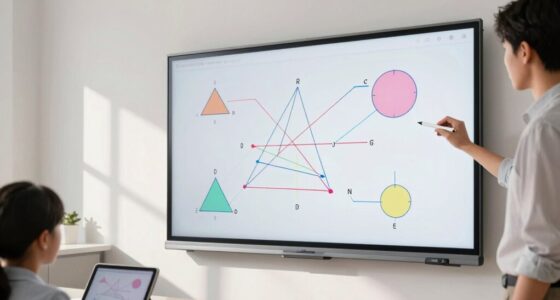
In today’s classrooms, integrating technology into geometry lessons can greatly enhance student understanding, and document cameras are playing a key role in this shift. These devices allow you to display physical objects, sketches, or student work instantly on a screen, making complex concepts more accessible. One of their most powerful features is digital annotation, which enables you to highlight, draw, or add notes directly onto the live image. As you project a geometric figure or a student’s problem, you can annotate in real time, guiding students through each step with clarity and precision. This immediate visual feedback helps students follow along more easily and deepens their comprehension.
Using document cameras with digital annotation enhances real-time guidance and deepens geometric understanding in the classroom.
Beyond individual instruction, document cameras support collaborative visualization, which is vital in a modern, interactive classroom. When students can see their work displayed clearly for everyone, it fosters a sense of shared learning. You can encourage students to come up to the camera and demonstrate their solutions, enabling peer review and discussion. This collaborative approach promotes active engagement and helps students learn from each other’s strategies, whether they’re constructing a proof or exploring a geometric theorem. The ability to instantly display and annotate student work makes collaboration seamless and dynamic, breaking down barriers of traditional teaching. Incorporating visual learning tools like document cameras also helps cater to diverse learning styles and enhances overall classroom engagement. Additionally, integrating such tools can support digital literacy, which is increasingly essential in modern education. Recognizing the importance of educational technology integration, teachers can better meet the evolving needs of students in a digital age.
Incorporating document cameras into your geometry workflow also streamlines lesson planning and delivery. Instead of switching between multiple tools, you can easily capture sketches, diagrams, or student responses and immediately enhance them with digital annotation. This flexibility allows you to adapt your teaching in real time, addressing misconceptions or emphasizing key points without delay. Moreover, the visual nature of the technology helps cater to diverse learning styles. Visual learners benefit from clear, annotated images, while kinesthetic learners can actively participate by presenting their work to the class. Additionally, integrating visual tools like document cameras aligns with design thinking principles that emphasize innovative, student-centered approaches. Utilizing such technology also fosters engagement, which is essential for effective learning and retention.
The integration of document cameras into your geometry lessons encourages an interactive, student-centered environment. You can quickly transition from teacher-led demonstrations to student-led explanations, fostering ownership of learning. The ability to annotate digitally keeps the flow of instruction smooth and engaging, as you can highlight key features of geometric figures, demonstrate transformations, or explore constructions with ease. These tools transform a traditional lecture into an active, collaborative experience that makes abstract concepts tangible and easier to grasp.
As an affiliate, we earn on qualifying purchases.
Frequently Asked Questions
Can Document Cameras Be Integrated With Interactive Whiteboards?
Yes, you can integrate document cameras with interactive whiteboards to boost digital annotation and student engagement. When you connect a document camera, you can display physical materials directly onto the whiteboard, allowing students to follow along easily. This setup encourages active participation, as students can see complex diagrams clearly and contribute their annotations in real-time, making lessons more interactive and effective.
What Are the Best Models for High-Resolution Geometry Work?
You’ll want models like the Epson DC-20 and IPEVO Ziggi-HD Plus for high-resolution geometry work—they offer sharp resolution options that reveal every precise detail. Ironically, while they boast excellent resolution, their mounting flexibility allows you to position them effortlessly, ensuring you capture complex diagrams from any angle. These cameras make it easy to switch between detailed close-ups and overall views, perfect for tackling intricate geometric concepts with clarity.
How Do Document Cameras Compare to Traditional Overhead Projectors?
Document cameras offer a clear upgrade over traditional overhead projectors by providing digital display capabilities and advanced projection technology. You can easily display detailed geometric diagrams or student work with high resolution, making lessons more engaging. Unlike overhead projectors, which rely on transparency slides, document cameras capture real-time images and adapt seamlessly to digital workflows. This makes teaching more interactive and allows for quick adjustments, fostering a more dynamic learning environment.
Are Document Cameras Suitable for Remote or Hybrid Geometry Instruction?
Yes, document cameras are suitable for remote or hybrid geometry instruction. They enable digital collaboration by allowing you to share detailed visuals with students, maintaining high visual clarity. You can easily showcase geometric diagrams, calculations, or physical models in real-time, whether you’re in the classroom or online. This flexibility keeps students engaged and guarantees everyone has clear, consistent access to visual content, enhancing overall understanding and interaction.
What Are the Maintenance Requirements for Long-Term Use?
You need to stay on top of maintenance to keep your document camera in tip-top shape. Follow a regular cleaning schedule to prevent dust buildup and smudges, which can affect image clarity. Store the camera in a safe, designated storage solution when not in use to prevent damage. Check cables and connections periodically, and keep software updated. With proper care, your device will serve you well for the long haul.
digital classroom document camera
As an affiliate, we earn on qualifying purchases.
As an affiliate, we earn on qualifying purchases.
Conclusion
Incorporating document cameras into your geometry workflow transforms your teaching into an interactive, dynamic experience that feels like having a superpower. They make complex concepts crystal clear and engage students like never before. By seamlessly integrating these tools, you’ll elevate your lessons from ordinary to extraordinary—almost as if you’ve revealed a secret weapon for understanding. Embrace the future of education and watch your students’ geometric understanding soar to heights that once seemed impossible!
As an affiliate, we earn on qualifying purchases.
interactive teaching document camera
As an affiliate, we earn on qualifying purchases.
As an affiliate, we earn on qualifying purchases.
Fall Picks
fall essentials
As an affiliate, we earn on qualifying purchases.