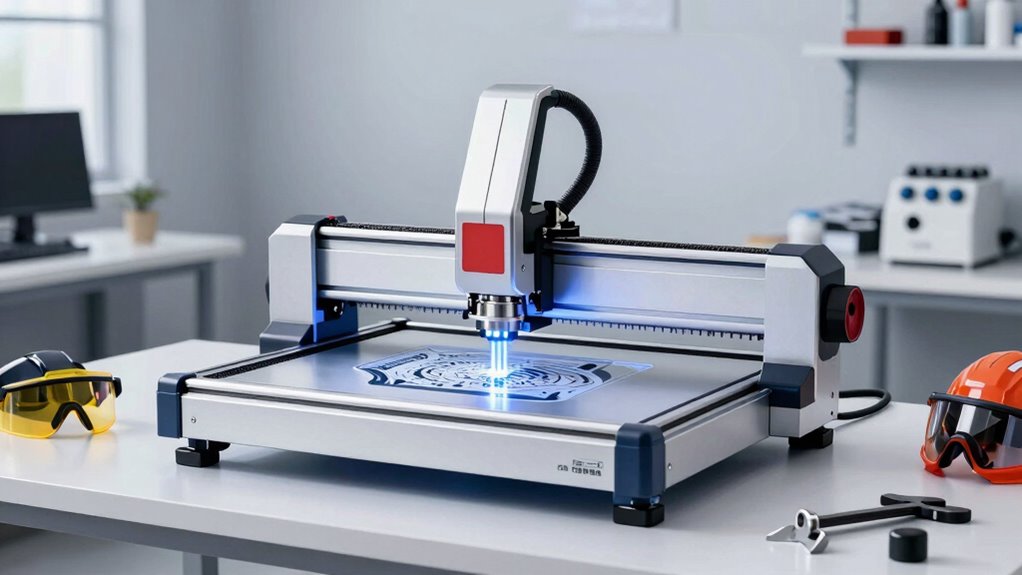

For small businesses, a high-power diode laser cutter can help produce signs, personalized goods, and short-run parts, but the right choice depends on material, work area, and production pace. I’d put the ACMER P1 S Pro 36W in the best overall position for its stated power and business-focused balance, while the xTool F1 Ultra stands out for buyers who need both fiber and diode marking, and the ACMER S2 20W offers a lower-power alternative for lighter workloads. Higher output can improve cutting capability, yet it does not replace a suitable enclosure, ventilation, air assist, or realistic production planning. Several products in this lineup are low-power engravers rather than strong cutting choices, so matching wattage to your materials matters. Read on for the full comparison and guidance on choosing by workload.

Prime made for students and young adults
- Fast, free delivery for dorm and study essentials
- Prime Video and Amazon Music included
- Member-only deals
Key Takeaways
- ACMER P1 S Pro 36W is the strongest all-around fit among these listed diode machines for a small shop that needs a balance of cutting headroom and general engraving.
- ACMER P1 S Pro 48000mW advertises the highest power in the lineup, but buyers should verify whether that figure describes optical output and compare it with the 36W model’s documented specifications.
- xTool F1 Ultra is the distinct choice for shops that need fiber and diode capability; its dual-laser approach serves a broader material mix than a diode-only machine.
- Acmer S2 20W and Carverall X1/JL9 20W sit in the middle of the lineup, making them more plausible for regular light production than the 2.5W and 3W-class options.
- Artilume U1, ACMER S1, TwoTrees TTS-10 Pro, and WIZMAKER WAND are lower-power picks better aligned with engraving and lighter jobs than frequent cutting for business orders.
| ACMER P1 S Pro 36W Diode Laser Engraver and Cutter |  | Best Overall | Laser power options: 20W, 36W, and 48W | Repeat positioning accuracy: 0.01 mm | Air assist: 25L | VIEW ON AMAZON | See Our Full Breakdown |
| Artilume U1 Laser Engraver 3000mW with APP Control & USB, 0.01mm Precision, Large 150x200mm Working Area for Wood, Leather, Acrylic, and More |  | Best for Small Engraving Jobs | Laser power: 3000 mW | Working area: 150 × 200 mm | Laser precision: 0.01 mm | VIEW ON AMAZON | See Our Full Breakdown |
| Acmer S2 20W Diode Laser Engraver and Cutter |  | Best for Cross-Platform Small Shops | Laser power: 20W | Laser wavelength: 455 ± 5 nm | Working area: 300 × 285 mm | VIEW ON AMAZON | See Our Full Breakdown |
| LASER TREE 40W Diode Laser Module for Laser Cutting and Engraving | 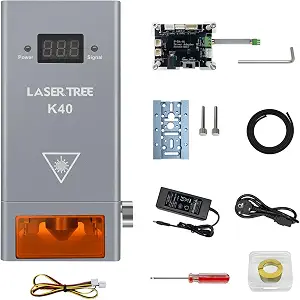 | Best High-Power Upgrade Module | Model: LT-K40 | Laser output: 40W+; up to 44,000mW optical power | Laser class: Class 4 | VIEW ON AMAZON | See Our Full Breakdown |
| ACMER S1 Laser Engraver Machine, 2500mW Laser Cutter for Wood and Acrylic |  | Best Compact Starter | Laser power: 2500 mW diode | Machine output: 24W | Wavelength: 455 ± 5 nm | VIEW ON AMAZON | See Our Full Breakdown |
| TwoTrees TTS-10 Pro 10W Laser Engraver |  | Best for Entry-Level Shop Work | Optical power: 10W | Laser wavelength: 450nm | Work area: 300 × 300 mm | VIEW ON AMAZON | See Our Full Breakdown |
| xTool F1 Ultra 20W Fiber & Diode Dual Laser Engraver |  | Best for Metal Customization | Laser sources: 20W fiber and 20W diode | Maximum speed: 10,000 mm/s | Working area: 220 × 220 mm; expandable to 220 × 500 mm with optional Auto Conveyor | VIEW ON AMAZON | See Our Full Breakdown |
| Carverall X1/JL9 20W Laser Engraver and Cutter with Air Assist |  | Best for Cutting Thick Wood | Laser power: 20W (verified 20.2–20.6W) | Laser class: Class 1 | Work area: 300 × 300 mm | VIEW ON AMAZON | See Our Full Breakdown |
| WIZMAKER WAND 12W Desktop Laser Engraver and Cutter |  | Best for Flexible Connectivity | Laser power: 12W | Work area: 300 × 300 mm | Repeatable positioning accuracy: 0.1 mm | VIEW ON AMAZON | See Our Full Breakdown |
| ACMER P1 S Pro Laser Engraver and Cutter, 48000mW High Power Diode Machine |  | Best for Power-Option Flexibility | Laser power options: 20W, 36W, or 48W | Repeat positioning accuracy: 0.01mm | Air assist: 25L/min | VIEW ON AMAZON | See Our Full Breakdown |
| ACMER S1 Laser Engraver and Cutter for Wood and Acrylic |  | Best Compact Starter Pick | Laser power: 2500 mW diode laser | Machine output: 24 W | Wavelength: 455 ± 5 nm | VIEW ON AMAZON | See Our Full Breakdown |
| high power diode laser cutter for small businesse | Laser power |
|---|---|
| ACMER P1 S Pro 36W Diode Laser | — |
| Artilume U1 Laser Engraver 300 | 3000 mW |
| Acmer S2 20W Diode Laser Engra | 20W |
| LASER TREE 40W Diode Laser Mod | — |
| ACMER S1 Laser Engraver Machin | 2500 mW diode |
| TwoTrees TTS-10 Pro 10W Laser | — |
| xTool F1 Ultra 20W Fiber & Dio | — |
| Carverall X1/JL9 20W Laser Eng | 20W (verified 20.2–20.6W) |
| WIZMAKER WAND 12W Desktop Lase | 12W |
| ACMER P1 S Pro Laser Engraver | — |
| ACMER S1 Laser Engraver and Cu | 2500 mW diode laser |
More Details on Our Top Picks
ACMER P1 S Pro 36W Diode Laser Engraver and Cutter
I’d put the ACMER P1 S Pro first for a small shop that needs a capable cutter and detailed engraver in one machine. Its 36W listed configuration, 25L air assist, and reinforced aluminum frame suit regular work on wood, acrylic, leather, and other listed materials. Air assist can help keep cut edges cleaner, while Wi-Fi and offline operation give a shop options for running jobs without tying up a computer. Compared with the Acmer S2 20W, this model is positioned for buyers prioritizing more laser power; the S2 provides a clearly stated work area and speed. The main caveat is configuration: the product data lists 20W, 36W, and 48W options, so I’d verify which version is included. Metal work is limited to coated surfaces, and no work area is specified.
Pros:- 25L air assist can help reduce burn marks and improve cutting edges
- 0.01 mm repeat positioning accuracy supports detailed repeat jobs
- Wi-Fi and offline operation offer flexible ways to run jobs
- Reinforced aluminum frame and broad listed material compatibility
Cons:- Listing includes several power options, leaving the shipped configuration unclear
- Metal engraving is limited to coated surfaces
- Working area is not specified in the supplied product data
Best for: Small businesses cutting and engraving wood or acrylic that want air assist and flexible job connectivity, after confirming the included power configuration.
Not ideal for: Shops needing uncoated metal engraving, a specified large work area, or certainty about the included laser power before purchase.
- Laser power options:20W, 36W, and 48W
- Repeat positioning accuracy:0.01 mm
- Air assist:25L
- Frame:Reinforced aluminum
- Connectivity:Wi-Fi and offline mode
- Compatible materials:Wood, acrylic, leather, plastic, paper, PCB, and coated metal
Our verdict“Choose the P1 S Pro for a small shop seeking a versatile, air-assisted diode cutter, provided the seller confirms the included power version.”
Artilume U1 Laser Engraver 3000mW with APP Control & USB, 0.01mm Precision, Large 150x200mm Working Area for Wood, Leather, Acrylic, and More
The Artilume U1 is the low-power specialist in this group: its 3W laser and 150 × 200 mm work area make it suited to marking and engraving, not the cutting demands implied by a high-power shop cutter. I’d consider it for a business adding personalized labels, small signs, or decorative details, especially where app, Wi-Fi, USB, or TF card control fits the workflow. Its 0.01 mm precision figure is comparable to the ACMER P1 S Pro’s stated repeat positioning accuracy, but that similarity does not make their cutting capacity equivalent. The ACMER offers multiple higher-power configurations and air assist, while the U1’s supplied data does not specify either. Its compact, pre-assembled setup is convenient, though the modest power and work area put a firm ceiling on production scale.
Pros:- 150 × 200 mm work area accommodates small personalized pieces
- USB, TF card, Wi-Fi, and app connectivity provide several job-control options
- Pre-assembled setup is beginner-friendly
- Stated laser module lifespan exceeds 10,000 hours
Cons:- 3W laser power is aimed at engraving rather than substantial cutting
- Working area is smaller than many production-oriented cutter setups
- Supplied details do not specify air assist or an enclosure
Best for: Small makers producing personalized engravings on compact items who value app and wireless control more than cutting throughput.
Not ideal for: Businesses that need to cut thick stock, process large panels, or run a high-power diode laser as a primary production machine.
- Laser power:3000 mW
- Working area:150 × 200 mm
- Laser precision:0.01 mm
- Connectivity:USB, TF card, Wi-Fi, and app
- Compatible materials:Wood, leather, acrylic, ceramics, stone, and metals
- Laser module lifespan:More than 10,000 hours
- Item dimensions:13.4 × 11.4 × 5.8 inches
- Item weight:5.44 pounds
Our verdict“Pick the U1 for compact personalization and engraving work, but choose the ACMER P1 S Pro or another higher-power model for meaningful cutting needs.”
Acmer S2 20W Diode Laser Engraver and Cutter
The Acmer S2 makes sense for a small business that wants a defined mid-power setup and compatibility with the computers it already uses. Its 20W laser, 300 × 285 mm work area, and 25L/min air assist offer a more concrete operating picture than the Artilume U1, which has lower power and a smaller listed bed. The S2 also supports Windows, macOS, and Linux, useful when a shop’s design and production machines run different systems. A stated 10,000 mm/min maximum engraving speed and 0.09 × 0.1 mm spot size point to detailed work, though headline speed alone does not establish production throughput. Compared with the ACMER P1 S Pro, the S2’s power is lower, but its work area and operating specs are clearer. The supplied information does not mention an enclosure or laser eye protection.
Pros:- 300 × 285 mm working area is specified for planning job size
- 25L/min air assist can help improve cut edges and reduce scorching
- Supports Windows, macOS, and Linux
- Listed 20W laser power and 0.09 × 0.1 mm spot size suit detailed mixed-material work
Cons:- 20W output is below the listed higher-power ACMER P1 S Pro options
- Product data does not specify an enclosure or other eye-protection equipment
- Maximum engraving speed does not establish typical production throughput
Best for: Small shops using Windows, macOS, or Linux that need a specified work area and air-assisted engraving and cutting for mixed materials.
Not ideal for: Businesses needing the highest stated diode power in this batch or a package with a specified enclosure and eye-protection setup.
- Laser power:20W
- Laser wavelength:455 ± 5 nm
- Working area:300 × 285 mm
- Laser spot size:0.09 × 0.1 mm
- Engraving accuracy:Up to 0.01 mm
- Air assist flow rate:25L/min
- Maximum engraving speed:10,000 mm/min
- Supported operating systems:Windows, macOS, and Linux
Our verdict“Choose the S2 when a cross-platform workflow and clearly specified work area matter more than maximum laser power.”
LASER TREE 40W Diode Laser Module for Laser Cutting and Engraving
For a small business that already owns a compatible machine, the LASER TREE K40 offers the strongest stated output here: 40W+ output, up to 44,000mW optical power. Its built-in air assist and dual fan cooling are relevant to repeated cutting jobs, and the listed one-pass capacities on pinewood, acrylic, and plywood suggest a focus on thick stock. Those figures stand apart from the ready-to-run ACMER P1 S Pro, which is a complete engraver and cutter rather than a replacement module. That distinction matters: the K40 requires a TTL/PWM-controlled host machine and careful electrical compatibility checks. It is a Class 4 laser, so buyers need a suitable safety setup in their shop. I’d shortlist it for an equipped workshop seeking a power upgrade, not for a first-time buyer looking for a complete desktop system.
Pros:- Up to 44,000mW optical output is the highest stated power in this batch
- Built-in air assist supports cleaner cutting
- Dual fan cooling is designed to manage heat during operation
- Adapter board and sliding bracket support a range of listed host machines
Cons:- Requires a compatible host machine and electrical checks before installation
- Class 4 laser requires an appropriate safety setup
- Supplied data does not state a working area or provide a complete machine
Best for: Small manufacturing or fabrication shops with a compatible TTL/PWM machine that need a higher-output module for cutting thicker listed materials.
Not ideal for: First-time laser buyers or shops without an existing compatible host, electrical setup, and Class 4 laser safety provisions.
- Model:LT-K40
- Laser output:40W+; up to 44,000mW optical power
- Laser class:Class 4
- Diodes:8 fast-axis compression diodes
- Listed cutting capacity:30 mm pinewood, 15 mm acrylic, and 30 mm plywood in one pass
- Cooling:Dual fan cooling
- Air assist:Built-in
- Compatibility:TTL/PWM-controlled DIY machines, laser engraver cutters, CNC laser machines, and 3D printers
- Warranty:12 months
Our verdict“Choose the K40 as a high-output upgrade for a compatible, safety-equipped shop rather than as a standalone starter cutter.”
ACMER S1 Laser Engraver Machine, 2500mW Laser Cutter for Wood and Acrylic
The ACMER S1 favors a small footprint and simple setup over production capacity. It arrives 99% preassembled, weighs about 2 kg, and supports Acmerstudio, LightBurn, and LaserGRBL across macOS, Windows, and Linux. That combination can suit a maker business testing personalized goods or processing small items without dedicating much bench space. Its 130 × 130 mm work area is the key limit: the Acmer S2 offers a substantially larger stated bed, while the S1’s 2500mW diode is suited to thin material cutting and engraving rather than demanding shop work. The product also lists a 24W machine output, a separate figure from the diode laser power. I’d choose this model for compact, light-duty jobs, not as a primary cutter for a growing business.
Pros:- Compact 250 × 250 × 162 mm machine weighs about 2 kg
- 99% preassembled setup reduces initial assembly work
- Supports Acmerstudio, LightBurn, and LaserGRBL
- Works with macOS, Windows, and Linux
Cons:- 130 × 130 mm work area restricts the size of jobs
- Listed cutting capability is limited to thin plywood, MDF, and acrylic
- 2500mW diode power is modest beside the 20W Acmer S2
Best for: Solo makers and microbusinesses producing small engraved goods who need a compact, nearly assembled machine and broad software compatibility.
Not ideal for: Shops cutting thicker stock, processing larger pieces, or seeking the output and work capacity of a production-oriented diode cutter.
- Laser power:2500 mW diode
- Machine output:24W
- Wavelength:455 ± 5 nm
- Engraving speed:Up to 10,000 mm/min
- Positioning accuracy:0.01 mm
- Working area:130 × 130 mm
- Machine dimensions:250 × 250 × 162 mm
- Weight:2 kg
- Assembly:99% preassembled
Our verdict“Pick the S1 for compact, light-duty engraving and thin cuts; move to the Acmer S2 when job size or cutting demands grow.”
TwoTrees TTS-10 Pro 10W Laser Engraver
I’d place the TTS-10 Pro among the more approachable options for a small business adding engraving to its workflow. Its 10W diode laser and 300 × 300 mm work area suit personalized wood, leather, and coated-item jobs, while LightBurn and LaserGRBL support familiar ways to prepare designs. Offline TF-card operation can help when a dedicated computer is not convenient. Compared with the Carverall JL9, it has less power for cutting thick stock, so it is better matched to engraving and lighter cutting than production work that depends on deep, single-pass cuts. Bare steel and uncoated metal also need marking spray or surface preparation. I’d choose it for a business testing a varied engraving service; shops already committed to thicker material cutting should look at the higher-powered Carverall.
Pros:- 300 × 300 mm work area accommodates a useful range of small business projects
- Works with LightBurn and LaserGRBL
- Supports both computer-connected and TF-card offline operation
- Includes a 4GB TF card, card reader, and assembly tools
Cons:- 10W output is less suited to thick-stock cutting than the 20W Carverall JL9
- Bare steel and uncoated metal require marking spray or surface preparation
- The work area limits projects larger than about 12 inches
Best for: Small businesses starting a custom engraving service for wood, leather, bamboo, and coated items
Not ideal for: Shops that need frequent deep cuts, larger-than-12-inch jobs, or direct marking on bare metal
- Optical power:10W
- Laser wavelength:450nm
- Work area:300 × 300 mm
- Frame:Aluminum alloy and injection-molded parts
- Controller:32-bit dual-core MCU
- Offline operation:TF card; 4GB card included
- Software:LightBurn and LaserGRBL
- Warranty:12 months
Our verdict“Choose the TTS-10 Pro for a first engraving setup focused on varied small items rather than demanding cutting throughput.”
xTool F1 Ultra 20W Fiber & Diode Dual Laser Engraver
For a small business whose orders span metal goods and nonmetal products, the F1 Ultra earns its place through its 20W fiber and 20W diode lasers. The fiber source expands marking across metals, while the diode handles materials such as wood, acrylic, leather, and glass. That range sets it apart from the Carverall JL9, which offers stronger stated plywood cutting but lacks the F1 Ultra’s fiber laser for broad metal work. A 16MP camera and enclosed design support positioning and customer-facing personalization; the optional conveyor can extend the work area for batches, but adds a separate accessory requirement. The Class 4 designation calls for disciplined safety practices. I’d pick this for a storefront or studio making varied customized goods, while a shop focused on large sheets or routine deep metal cuts should choose a different setup.
Pros:- Fiber and diode lasers cover a broad mix of metals and nonmetals
- Up to 10,000 mm/s engraving speed supports fast personalization jobs
- 16MP camera assists with positioning designs on customer items
- Enclosed design includes smoke extraction, fire alarm, and emergency stop
Cons:- Auto Conveyor for an expanded 220 × 500 mm area is sold separately
- Class 4 laser requires strict safety procedures
- Fiber laser cutting is limited to very thin metals
Best for: In-store customization businesses engraving metal gifts alongside wood, acrylic, and leather products
Not ideal for: Small shops focused on large-format cutting or deep metal cutting without added production equipment
- Laser sources:20W fiber and 20W diode
- Maximum speed:10,000 mm/s
- Working area:220 × 220 mm; expandable to 220 × 500 mm with optional Auto Conveyor
- Camera:16MP smart camera
- Maximum wood cutting thickness:15mm
- Maximum black acrylic cutting thickness:12mm
- Metal cutting:Stainless steel 0.3mm, brass 0.4mm, aluminum 0.2mm
- Laser class:Class 4
Our verdict“Choose the F1 Ultra if metal personalization is central to your business and you can manage its safety and batch-production requirements.”
Carverall X1/JL9 20W Laser Engraver and Cutter with Air Assist
The Carverall JL9 is the strongest fit here for a small business that regularly cuts wood as well as engraves it. Its stated 20W output and single-pass cutting claims for plywood and pine give it a more cutting-focused profile than the TwoTrees TTS-10 Pro. The built-in air assist is designed to reduce burn marks, which can mean less cleanup on cut edges, while three preset focus lengths make switching among tasks more direct. Its 300 × 300 mm bed still sets a firm size limit, and bare metal marking requires an upgraded module, so the broad material claim does not make it a metal-work solution. I’d favor it over the WIZMAKER WAND for thicker wood jobs; the WIZMAKER’s lower power and stated cutting depth make more sense for lighter work and flexible connectivity.
Pros:- 20W output with stated single-pass cutting of plywood up to 15mm
- Built-in air assist helps limit burn marks and edge cleanup
- Three preset focus lengths speed task changes
- Compatible with CutLabX, LightBurn, and LaserGRBL
Cons:- Bare metal marking needs an upgraded 40W diode or 1064nm IR module
- 300 × 300 mm work area constrains larger products
- Accessories such as an air purifier and honeycomb plate are sold separately
Best for: Small makers producing signs, decor, and parts from plywood or pine within a 300 × 300 mm area
Not ideal for: Businesses needing direct bare-metal marking, larger workpieces, or frequent production beyond the stated cutting limits
- Laser power:20W (verified 20.2–20.6W)
- Laser class:Class 1
- Work area:300 × 300 mm
- Focus lengths:3mm, 5mm, and 7mm presets
- Air assist:Built-in air pump
- Cooling:Dual-fan system
- Maximum plywood cutting depth:15mm single pass
- Software:CutLabX, LightBurn, and LaserGRBL
Our verdict“Choose the JL9 for a compact shop where cutting thicker wood cleanly matters more than metal marking or larger-format work.”
WIZMAKER WAND 12W Desktop Laser Engraver and Cutter
The WIZMAKER WAND suits a small operation where the laser may be run from different devices or locations. It offers Wi-Fi, hotspot, and USB connections across Windows, macOS, Android, and iOS, with a 300 × 300 mm work area comparable to the TwoTrees TTS-10 Pro. Its 12W output and stated wood cutting up to 8mm make it a step up from the TwoTrees on paper for lighter cutting, but well behind the Carverall JL9 when thicker stock is the job. The 0.1 mm repeatable positioning accuracy and flame monitoring add useful shop-floor details; cutting depth still depends on settings and material conditions. I’d consider it for mixed engraving tasks and flexible device access, but not as a choice for thick-cut production or metal work beyond coated surfaces.
Pros:- 300 × 300 mm work area supports a broad range of small projects
- Connects by Wi-Fi, hotspot, or USB
- Compatible with Windows, macOS, Android, and iOS
- Tilt detection and flame monitoring are included
Cons:- Stated wood cutting up to 8mm depends on settings and conditions
- 12W output is less suited to thick cuts than the Carverall JL9
- Supported metal work is limited to coated metals
Best for: Small studios that need to prepare jobs from multiple operating systems and engrave a variety of small products
Not ideal for: Businesses centered on thick plywood cuts, bare-metal marking, or high-throughput cutting
- Laser power:12W
- Work area:300 × 300 mm
- Repeatable positioning accuracy:0.1 mm
- Maximum engraving speed:10,000 mm/min
- Maximum stated wood cutting thickness:Up to 8 mm under suitable settings
- Connectivity:Wi-Fi, hotspot, and USB
- Compatible platforms:Windows, macOS, Android, and iOS
- Safety features:Tilt detection and flame monitoring
Our verdict“Choose the WAND if device flexibility and general engraving matter more than cutting thick stock.”
ACMER P1 S Pro Laser Engraver and Cutter, 48000mW High Power Diode Machine
The P1 S Pro stands out for offering 20W, 36W, and 48W power options, giving a buyer room to match the machine to a small shop’s mix of engraving and cutting work. Its reinforced aluminum frame and 25L/min air assist are relevant for steadier operation and clearing debris from the cutting area. The 0.01mm repeat positioning figure is finer than the WIZMAKER WAND’s stated 0.1mm, though the supplied data gives no work area or cutting-depth figure to judge the practical job-size advantage. Compared with the Carverall JL9, this model emphasizes configurable power and Wi-Fi/offline operation, while the Carverall provides clearer stated wood-cutting capability and built-in safety controls. I’d choose the ACMER when flexibility is the priority and the operator can handle setup and calibration.
Pros:- Available power configurations of 20W, 36W, and 48W
- 0.01mm repeat positioning accuracy is suited to detailed work
- Reinforced aluminum frame is designed to reduce vibration
- Wi-Fi and offline operating modes are supported
Cons:- Requires technical setup and calibration
- Product data does not specify work area or maximum cutting depth
- Higher-power configurations may be more machine than casual users need
Best for: Small workshops deciding among several diode power levels for varied wood, acrylic, leather, and coated-metal jobs
Not ideal for: Beginners who want a clearly specified work area, cutting depth, and minimal setup or calibration
- Laser power options:20W, 36W, or 48W
- Repeat positioning accuracy:0.01mm
- Air assist:25L/min
- Frame material:Reinforced aluminum
- Control system:Smart laser control
- Connectivity:Wi-Fi
- Offline operation:Supported
- Listed materials:Wood, acrylic, leather, plastic, paper, PCB, and coated metal
Our verdict“Choose the P1 S Pro if you want to select among higher diode power levels and are comfortable validating setup for your workflow.”
ACMER S1 Laser Engraver and Cutter for Wood and Acrylic
The ACMER S1 suits a small shop that needs engraving and occasional cuts in thin sheet material without giving much bench space to the machine. Its 130 × 130 mm work area limits each project to small parts, tags, and samples, while the 10,000 mm/min maximum engraving speed and 0.01 mm repeatable positioning accuracy support detailed, repeatable work. Compared with the larger-bed Artilume U1, the S1 is easier to fit into a tight workspace but gives up usable project area. Its listed 2,500 mW diode laser and description of cutting thin plywood, MDF, and acrylic point to light-duty cutting rather than a production cutter for thicker stock. The machine arrives 99% preassembled and includes Acmerstudio, which helps reduce setup work, though buyers should confirm software compatibility with their workflow.
Pros:- Compact 250 × 250 × 162 mm machine with a listed weight of 2 kg
- 130 × 130 mm work area accommodates small engraved items and parts
- Maximum engraving speed of 10,000 mm/min and 0.01 mm repeatable positioning accuracy
- 99% preassembled and includes Acmerstudio software
Cons:- Small work area restricts project size and batch layout
- Cutting is described for thin materials, limiting its use for heavier cutting work
- The listed 2,500 mW diode laser is better suited to light-duty tasks than demanding production cutting
Best for: Small-business owners making engraved samples, tags, and small goods from wood, leather, or other listed materials in a limited workspace
Not ideal for: Shops that need to cut thick stock, process larger panels, or run frequent high-volume cutting jobs
- Laser power:2500 mW diode laser
- Machine output:24 W
- Wavelength:455 ± 5 nm
- Working area:130 × 130 mm
- Maximum engraving speed:10,000 mm/min
- Repeatable positioning accuracy:0.01 mm
- Machine dimensions:250 × 250 × 162 mm
- Machine weight:2 kg
- Assembly:99% preassembled
Our verdict“Choose the ACMER S1 for compact engraving and occasional thin-sheet cuts; choose a larger-bed or higher-power option if your shop needs bigger or heavier cutting jobs.”

How We Picked
I ranked these machines by how well their stated capabilities match the needs of a small business: repeatable work, useful cutting headroom, material range, and a practical balance between production goals and machine complexity. I gave more weight to clearly stated diode power and business-relevant versatility than to small spot-size claims or broad material lists, since those details alone do not establish cutting speed or depth. A machine’s suitability also depends on its working area, air assist, enclosure, exhaust setup, and the maker’s support and replacement parts; where those details are absent from the supplied product names, I avoid treating them as established advantages.
The ranking separates machines suited to regular production from those better used for occasional engraving. The 36W ACMER P1 S Pro leads as a stated higher-power diode option, while the 48W-labelled P1 S Pro may appeal to buyers seeking more output but deserves careful specification checks. The dual-source xTool earns a specific role for material versatility, not as a direct stand-in for a diode-only cutter. Models rated at 20W or below rank behind these options for demanding cutting workloads, with the 2.5W and 3W-class machines positioned as engraving-first choices.
Factors to Consider When Choosing High Power Diode Laser Cutter For Small Businesses
Before choosing a machine, I’d start with the jobs you expect to repeat and the materials those orders require. The nameplate wattage is only one part of the decision: workflow, safe operation, work dimensions, and the time available per order can matter just as much.
Match Optical Output to the Work You Sell
Laser listings can mix optical output, electrical input, and model naming, so compare like with like before treating a larger wattage number as proof of faster cutting. Ask the seller for the optical output specification and cutting guidance for your actual material and thickness. A higher-output diode can improve headroom on suitable materials, but it does not make every material safe or practical to process. Run sample cuts before accepting customer deadlines, especially when edge quality or multiple passes affect finishing time. If most orders are engraving, a lower-power unit may meet the need while leaving budget and space for workflow improvements.
Calculate Throughput Around Real Orders
Small businesses need predictable completion times, not just a machine that can eventually finish a cut. Estimate jobs per day using the full cycle: setup, focus, cutting or engraving, cleanup, and any finishing work. A large batch of personalized items may favor a repeatable fixture and convenient work area over a small gain in peak output. Keep spare capacity for test pieces, failed jobs, and maintenance rather than planning around nonstop operation. Before buying, ask whether the maker publishes realistic job examples or settings for the materials you intend to use.
Plan for the Workpiece Size and Shape
The advertised working area should fit the largest item you expect to process, with room for positioning and any fixtures. A compact bed can be limiting for signs or batches even when the laser has enough power for the material. Check whether the frame supports pass-through work, extensions, or rotary accessories if your products need them. Add the dimensions of clamps and jigs to your planning; nominal bed size is not always usable cutting space. For a new business, choosing a machine around the products you can sell repeatedly is usually more useful than buying extra capacity without a defined job.
Budget for Ventilation, Fire Safety, and Air Assist
Laser processing creates smoke and can create fire risk, so plan the workspace before placing the machine in a shop or shared room. Check what enclosure, exhaust connection, and filtration arrangements are included and what must be sourced separately. Air assist can help manage smoke and debris at the cut, but it does not replace supervision or ventilation. Confirm local requirements for the materials and workspace you use, and keep an appropriate fire response plan nearby. These operating needs affect setup cost and usable shop space, even when the machine itself looks compact.
Check Material Limits and the Fiber-versus-Diode Tradeoff
A diode machine is suited to many engraving and cutting tasks on materials such as wood and some coated or opaque surfaces, but a product’s broad compatibility wording should not be read as a guarantee for every acrylic or metal job. Verify material-specific guidance, including whether a coating or marking compound is required. If your business needs direct marking on metals, a fiber source may cover jobs that a diode source cannot handle in the same way. A dual-source machine can widen the range of work, though it adds complexity and may not be worthwhile if your orders are mostly wood products. Base the choice on confirmed customer demand, not on the longest material list.
Evaluate Support and Maintenance Before Scaling
For a business, downtime can delay orders, so check parts availability, warranty terms, software support, and the process for resolving faults. Ask how often the lens and motion system need cleaning and which consumables are expected for your workload. An inexpensive machine can become a poor fit if replacement modules are hard to obtain or documentation is incomplete. Save tested settings for each material and maintain a log of lens cleaning, alignment checks, and recurring issues. If production depends on the laser, leave room in the plan for service interruptions or a backup supplier.
Frequently Asked Questions
Is a 20W diode laser enough for a small business?
It can suit a business centered on engraving, personalization, and occasional cutting of suitable materials, but it may constrain thicker or frequent cutting jobs. The Acmer S2 and Carverall 20W models make more sense for lighter workloads than the higher-rated ACMER P1 S Pro options. Test the exact material, thickness, and finish your customers expect before promising turnaround times. If cutting is central to your product line, ask for documented settings and sample results rather than relying on wattage alone. Plan for a higher-output machine if those trials show too many passes or slow cycles.
Should I choose the ACMER P1 S Pro labelled 48,000mW over the 36W version?
Not from the headline number alone. The 48,000mW label suggests a higher rating, but listings can use different power measurements, so first confirm both machines’ optical output and included laser module. Compare supported materials, working area, air assist, warranty, and replacement-part availability as well. A nominal output advantage only helps if it improves the jobs you actually sell and the rest of the machine can support your workflow. If those details are unclear, the 36W model’s more straightforward stated rating may be easier to evaluate.
Can these diode lasers cut acrylic for customer orders?
Some diode lasers can process certain acrylic types, but results depend on the material’s color, composition, thickness, and the machine’s output. Clear acrylic is generally a poor match for many diode wavelengths, so broad claims that a machine works with “acrylic” need material-specific confirmation. Request settings or sample results for the exact sheet you plan to buy and check the supplier’s safety guidance. For reliable acrylic production, compare the diode workflow with a laser type designed for that material. Do not promise a finish or throughput until you have run production-like samples.
Do I need a fiber laser if I already have a diode cutter?
A fiber source is useful when customer work includes direct marking or engraving on metals that a diode machine cannot process effectively. The xTool F1 Ultra’s dual fiber and diode setup is the lineup’s clearest choice for that broader mix. If your products are mainly wood, leather, or suitable coated materials, a diode-only machine may cover the work with less complexity. Review your actual order mix and the time spent outsourcing metal jobs before investing in a second laser source. The added versatility has value when you can put it to regular use.
What matters more for a small shop: more power or a larger work area?
It depends on the products and batch sizes you sell. Higher output can reduce the effort required for suitable cutting jobs, while a larger usable area can make signs, fixtures, or batch layouts possible in one setup. Measure your largest repeat order and test the slowest material in your planned catalog to identify the real bottleneck. Also account for jigs, clamps, and loading access rather than comparing bed dimensions alone. Pick the capacity that removes a demonstrated constraint in your workflow.
Conclusion
For a small business seeking a strong general-purpose diode cutter, I’d start with the ACMER P1 S Pro 36W as the best overall fit in this lineup. The ACMER P1 S Pro labelled 48,000mW is the higher-output candidate, provided its optical rating and included module are confirmed; for a distinct premium capability, the xTool F1 Ultra is the pick for shops that need fiber and diode work. Buyers focused on lighter production can compare the Acmer S2 20W and Carverall X1/JL9 20W, while beginners whose work is mostly engraving may prefer a lower-power ACMER S1 or TwoTrees TTS-10 Pro after checking safety and support needs. The Artilume U1 and WIZMAKER WAND fit small engraving tasks better than a business built around frequent cutting. Choose by the jobs you can verify and repeat, then confirm the machine’s specifications and workspace requirements before committing.
Halloween Picks
halloween
As an affiliate, we earn on qualifying purchases.